Property insights,
from the source.
No third-party estimates, no manual copy-paste, no guesswork. Live property data—for less than your monthly latte ☕.
Jordan Hayes
Joined June 15, 2025
"This saves me a ton of time when I’m pulling comps. I can screen deals way faster now."
Priya Nair
Joined June 15, 2025
"No more copy/paste into spreadsheets. The export is clean and my team actually uses it."
Marcus Reed
Joined June 16, 2025
"Comp sets take minutes instead of an hour. It keeps everything consistent across listings."
Alyssa Patel
Joined June 17, 2025
"The quick snapshot is perfect for deal triage. I can sanity check pricing in seconds."
Evan Brooks
Joined June 17, 2025
"I like that it uses what I’m already looking at. It feels simple and easy to trust."
Samantha Ortiz
Joined June 17, 2025
"Recording mode is huge for us. We can compare neighborhoods later without starting over."
Ben Carter
Joined June 17, 2025
"The filters save me so much time. I can dial in a comp set without bouncing between tabs."
Nina Park
Joined June 18, 2025
"Outliers jump out right away. It helps me catch weird listings before I waste time."
Caleb Fisher
Joined June 18, 2025
"Perfect before client calls. I get the key facts and a clean summary with one click."
Hannah Nguyen
Joined June 18, 2025
"The CSV is actually usable. No reformatting, just drop it into my sheet and go."
Omar Ali
Joined June 18, 2025
"It gets me to a price range fast. I don’t have to manually calculate anything anymore."
Grace Liu
Joined June 19, 2025
"It stays current because it’s reading the page. That matters a lot in fast markets."
Tyler Bennett
Joined June 19, 2025
"We run comps every week and this keeps us organized. The notes are easy to share."
Maya Singh
Joined June 19, 2025
"Fast, but not a black box. I can click back to the source and double check anything."
Cole Ramirez
Joined June 19, 2025
"My team loves it for quick pro formas. It makes rental assumptions way easier to justify."
Leah Price
Joined June 19, 2025
"It surfaces the stuff I care about like days on market and price changes. Huge time saver."
Derek Wallace
Joined June 20, 2025
"Everything comes out consistent, so my tracking sheet stays clean. That alone is worth it."
Isabella Flores
Joined June 20, 2025
"Unlimited exports is the best part. We’ve built our own little comp database over time."
Noah Grant
Joined June 20, 2025
"It pulls the details we always need for notes and handoffs. Less back and forth with the team."
Chloe Morgan
Joined June 21, 2025
"I can get through way more listings in a session. It speeds up my whole workflow."
Jordan Hayes
Joined June 15, 2025
"This saves me a ton of time when I’m pulling comps. I can screen deals way faster now."
Priya Nair
Joined June 15, 2025
"No more copy/paste into spreadsheets. The export is clean and my team actually uses it."
Marcus Reed
Joined June 16, 2025
"Comp sets take minutes instead of an hour. It keeps everything consistent across listings."
Jordan Hayes
Joined June 15, 2025
"This saves me a ton of time when I’m pulling comps. I can screen deals way faster now."
Priya Nair
Joined June 15, 2025
"No more copy/paste into spreadsheets. The export is clean and my team actually uses it."
Marcus Reed
Joined June 16, 2025
"Comp sets take minutes instead of an hour. It keeps everything consistent across listings."
Summarize Any Market
In Seconds
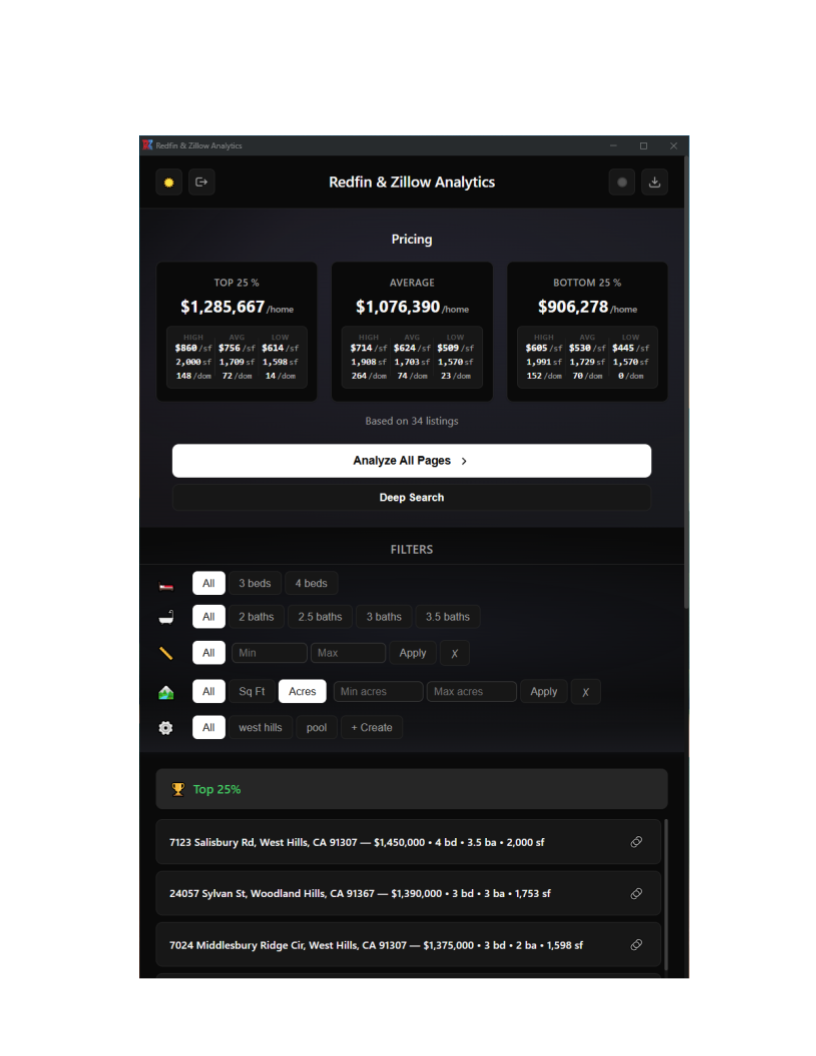
Open any Redfin or Zillow results page (active, sold, or rentals) or any listing page and run a 1‑click snapshot. We extract the critical fields, compute quick comp-friendly metrics (like price per square foot), and summarize the page into insights you can use immediately.
Page‑Accurate Data
Pulls from what you’re viewing in your own browser on Redfin or Zillow—fast to validate and always current.
Comp‑Ready Filtering
Segment by beds/baths, sqft, lot size, year built, and other key property fields.
Full Listing Details,
Automatically
Go beyond the summary tiles: Deep Extract opens each selected listing page and pulls the long listing description, agent & brokerage contact info, full property facts, and the data you need to run comps—without copy/paste.
Comp Set Builder
Flip through results, select comps, and extract consistent fields across every listing you choose.
Agent & Remarks Extraction
Pull agent contact info, brokerage details, and listing remarks into structured, exportable fields.
Build Your Own
Databases
Export clean, analysis‑ready data to CSV for your own spreadsheets, dashboards, and underwriting models. No caps, no throttles—export as often as you want.
Export
Export all the data you're working with for advanced analysis in Excel, Google Sheets, etc.
Import
Import previously saved files to view or update them, or upload a specific list
Create Your Own
Filters
Filter for exactly what you want to analyze. Refine your results by beds/baths, square footage, lot size, year built, price & listing history, and more—so your comp set matches your deal.
Precision Targeting
Narrow down to your exact comp set with filters for size, condition signals, fees, and key property facts.
Save & Reuse
Create custom filter combinations and save them for instant access to your most-used analyses
Tap to view full-size.
Export a Pre-filled
Financial Model
One click takes your selected comps and listing details and pre‑fills a professional Fix & Flip spreadsheet—so you can underwrite faster with fewer manual inputs.
Renovation + New Construction Support
Estimate both renovation flips and new builds with built‑in cost calculators (price per SF × scope SF) and clear project timelines.
Financing, Carry Costs, and Returns—Calculated
Includes acquisition + construction financing assumptions, monthly debt service, carry costs, commissions, all‑in cost, profit, equity multiple, and annualized return.
Comps‑Driven ARV + Sensitivity Table
Your comp set rolls up into an ARV estimate, plus a sensitivity table that shows how profit and returns change across different sale price scenarios.
Professional Analytics,
One Click Away
Click to Watch Demo
See the extension in action
See It In Action
Get comps-ready insights in seconds, using your own browser, on Redfin or Zillow
Four Workflows
From a fast listing snapshot to a full comp set + clean exports—pick the workflow you need.
Quick Snapshot
Instant summary for the page you’re viewing—key fields, comp-friendly metrics, and quick insights.
Comp Builder
Flip through results, select comps, and extract consistent fields across the full comp set.
Record & Compare
Save listings as you browse across neighborhoods and searches, then compare later with full context.
Export Studio
Export to CSV anytime (unlimited). Build a database, run your own models, and keep your pipeline moving.
How It Works
Get started in under 30 seconds
Subscribe & Install
Subscribe for $5/month and install the Chrome extension. No additional setup is required.
Open Redfin or Zillow
Navigate to a Redfin or Zillow results page (active, sold, or rentals) or any listing you want to analyze.
Summarize & Export
Click the extension icon to extract the data, generate insights, and export clean comps.
Everything at
Your Fingertips
Why Pay
20x More?
Use the sites you already trust (Redfin & Zillow) — then upgrade your workflow with instant insights + exports.
DealMachine
Comps + Sheets
Our Analytics
Extension
🎯 Bottom Line: Get unlimited exports + comp workflows for just $5/month or $50/year.
Ready to Run Comps Faster?
Turn Redfin & Zillow pages into structured data + meaningful insights—then export and validate in minutes.
Unlimited exports • 30-day billing • Cancel anytime